

Introduction
Choosing the right RAM (Random Access Memory) is one of the most important decisions whether you are building or upgrading a laptop or desktop PC. Whether you are a student, gamer, content creator, engineer, or even an office professional, the right RAM configuration can improve multitasking ability, and overall performance. This is written for 2026.
This complete RAM buying guide will try to explain everything you need to know, ranging from RAM types and speeds to capacity, latency, compatibility, to real-world use cases. We hope that this guide is helpful to upgrade your device.
Complete guide for choosing the best RAM required for your PC or Laptop
What Is RAM and Why Is It Important?
RAM is your system’s short-term working memory. It temporarily stores the data that your CPU needs to immediately access. This allows us to run applications, games, and operating systems to run smoothly without time lags.
Benefits of having substantial RAM in your PC:
- Faster application loading
- Smooth multitasking
- Better performance when running applications and games
- Reduced system lag
- Improved productivity in case of heavy workloads
Unlike storage (SSD or HDD), RAM is volatile. This means that all data is cleared when the system powers off.
How Much RAM Do You Need?
4GB RAM
4GB RAM is no longer practical for most users and present-day use cases. This is just suitable for small cloud-based tasks and light browsing and email viewing.
Only users with extremely limited needs or older systems running lightweight operating systems. 4GB RAM may be usable for some Chromebook users.
8GB RAM
8GB RAM is an entry-level recommendation for modern systems and is suitable only for casual users.
- Smooth performance when it comes to web browsing, office applications, and media streaming
- Can handle light multitasks like a few browser tabs and light productivity apps
- Suitable for entry-level programming and non 3D based photo editing.
- Still struggle with memory-heavy applications or multiple demanding programs running together
Limitations:
- Not ideal for long-term use and is not enough for future proofing
- Performance drops when using Chrome with many tabs, video editing software, or virtual machines
Best for:
Students, office users, and home users who just want an affordable setup for handling basic applications.
16GB RAM
16GB RAM is still the most popular choice for most users as it offers the best balance of performance and price. It is such a popular choice due to many reasons like:
- It more than enough light gaming
- It is ideal for engineering software and data analysis tools
- It can handle most content creation tasks like photo editing, video editing, and audio production
- Allows for seamless multitasking, even when it is dealing with dozens of browser tabs and multiple apps open
You can view our buying guide on Best Creator Laptops Under $1000.
Why 16GB is recommended and its limitation:
Most modern applications and operating systems are optimized for 16GB RAM, making it the most practical choice for power users and professionals alike. But it still does lack future proofing, so we wouldn’t call it the best choice for longevity.
32GB RAM
32GB RAM is designed for users who push their systems to their absolute limit. They are:
- Perfect for professional and high-level video editing, 3D rendering, and animation
- Essential for complex tasks like virtual machines, Docker containers, and software testing environments
- Smooth handling of even workloads involving AI/ML, large datasets, and advanced simulations
- Eliminates slowdowns during absolute heavy multitasking that involve modern applications
Best for:
It is needed for Content creators, data scientists, developers, and professionals who rely on demanding software daily and also want to future proof it for more demanding future applications.
Types of RAM, Speed, and Compatibility: Everything You Need to Know
Understanding RAM goes beyond just seeing its capacity and choosing the one with the most capacity. To choose the right memory, you must consider RAM type, speed channel configuration, form factor, and most importantly, it’s compatibility. This section will break down all these critical factors in a simple yet detailed manner for you to understand.
DDR4 vs DDR5 RAM: How are they different?
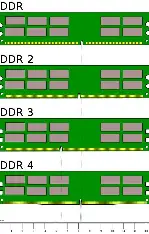
DDR4 RAM
DDR4 is the older generation of RAM, yet it remains widely used and highly relevant because if its affordability and broad compatibility. It offers speeds ranging from 2133MHz to 3600MHz. It also offers excellent stability and proven performance from these many years. It is ideal for users who are upgrading existing systems or those who want to build cost-effective PCs.
DDR5 RAM
DDR5 is the latest generation of system memory that is designed for next-generation performance and efficiency. Their speeds start at 4800MHz and can also exceed 7200MHz. They also provide significantly higher bandwidth when compared with DDR4 along with improved power efficiency. They are also essential for newer Intel and AMD platforms.
DDR5 is the best choice for users who are building new systems and want maximum performance and long-term future-proofing.
Important Compatibility Tip: Your motherboard determines which RAM type you can use. So, make sure to check the RAM’s compatibility with the motherboard before purchasing.
RAM Speed (MHz): How Much Does It Matter?
RAM speed affects how quickly data can move between the memory and the CPU. Hence, this will influence the system responsiveness and performance in handling demanding tasks.
Recommended RAM Speeds:
- DDR4: 3200MHz (performance sweet spot)
- DDR5: 5600MHz-6000MHz (best real-world balance)
When should you go for higher speeds? The short answer is, go for higher speeds if your work involves tasks like 3D rendering or handling of large data.
While higher speeds do improve performance, the gains diminish beyond a certain point, especially for everyday computing and office workloads.
RAM Latency (CL): Understanding Memory Timings
Latency refers to the delay between a request made and the RAM’s response. So, Lower CAS Latency (CL) means faster memory response.
Ideal RAM Latency Values
- DDR4: CL16-CL18
- DDR5: CL36-CL40
For the best performance, go for a balanced combination of high speed and low latency, rather than focusing on speed or latency individually.
Single Channel vs Dual Channel RAM
Single Channel RAM: This type of RAM only uses one RAM module. Because of this, it has lower memory bandwidth and reduced performance in memory-intensive tasks.
Dual Channel RAM: This type of RAM uses two identical RAM sticks. Due to two channels, it gives to 30-40% performance improvement in gaming and productivity
Always try to choose dual-channel RAM if possible.
Laptop RAM vs Desktop RAM
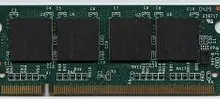
Laptop’s RAM (SO-DIMM): These are smaller sized RAM’s that are optimized for lower power usage. These also have limited upgradability. If you want a laptop for 3D rendering, you can see Best Budget Laptops For 3D Rendering.
Desktop RAM (DIMM): They have larger modules and can deliver faster speeds. They also allow vide range of upgrades.
Keep in mind, SO-DIMM and DIMM are not interchangeable.
RAM Compatibility Checklist (Very Important)
Before buying RAM, always confirm the following:
- Motherboard-supported RAM type which is either DDR4 or DDR5)
- There is always a maximum supported RAM capacity and also supported speed
If it is a laptop upgrade, then there will be very limited upgradability options.
Final Verdict: Choosing the Right RAM Made Simple
To choose the right RAM, you should start by clearly identifying your use-cases clearly. Once your needs are defined, go ahead and choose the correct RAM capacity. Make sure that it would provide you with enough memory for both current tasks and future software requirements. Next, and most importantly, choose a compatible RAM type (DDR4 or DDR5) based on your motherboard’s compatibility. This decision will directly impact system compatibility and stability.
Whenever possible, opt for a dual-channel configuration as it significantly improves memory bandwidth and hence will affect the overall performance. For most users in 2026, 16GB of DDR4 or DDR5 RAM in dual-channel configuration remains a smart and well-balanced choice, while upgrading to 32GB is recommended for those who want better future-proofing for upcoming applications and heavier workloads.