
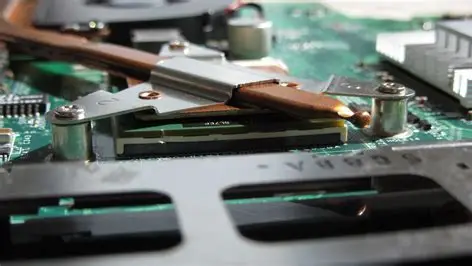
When people compare laptops, they usually just focus on the CPU, GPU, RAM, or display. But behind the scenes, the cooling system quietly decides how much of performance your laptop can really deliver. A poorly cooled machine will overheat and age faster, irrespective of its impressive on paper specs.
Laptop cooling solutions are slowly but surely becoming quieter, more compact, and much more effective. The industry is standing at a crossroads between highly refined traditional cooling systems and emerging solid-state alternatives that could redefine laptop design altogether.
In this article, we will explain how laptop cooling works and try to anticipate where the future of thermal management is headed. If you looking forward for a laptop buying guide, you can read our article on Best Laptops in 2026 (For Office, Graphic Design & Gaming).
Why Cooling Systems Are Critical in Laptops
Every task, be it opening a browser, sharing a video, rendering a 3D scene, or gaming, will for sure generate heat. The CPU, GPU, VRMs, and even SSDs produce heat as power consumed increases with each task.
If this heat is not removed efficiently, the following things may happen:
- Performance will drop due to thermal throttling
- Fans will become loud and inconsistent
- Battery health will degrade much faster
- Internal components may experience irreversible long-term issues
In short, cooling will directly affect the performance consistency, noise levels, and system lifespan.
How Laptop Cooling Works (Big Picture)
Laptop cooling systems follow a simple method for heat dissipation:
- It absorbs heat from hot components
- Then, it transfers heat away from the internal critical components
- Dissipation of heat outside the chassis
The challenge is doing all this in an ultra-thin enclosure while also limiting noise and power consumption.
Traditional Laptop Cooling Technologies
Despite rapid innovation, most laptops even today rely on advanced conventional cooling. In this section we will discuss some of them.
1. Liquid Metal Thermal Paste
Liquid metal has emerged as a true game-changer in modern premium laptops. Unlike the traditional thermal paste based systems, liquid metal conducts heat far more efficiently and also allows heat to move away from the CPU and GPU far faster. This results in noticeably lower peak temperatures and also helps the processors to sustain higher boost clocks for longer periods without much issue of throttling.
2. Vapor Chambers
Vapor chambers have also become a defining feature of modern high-end laptop cooling systems. In comparison to conventional heat pipes, vapor chambers transfer heat more quickly and spread it evenly across a larger surface area. This prevents localized thermal hotspots and thus allows manufacturers to design thinner laptops without compromising thermal stability. They are used mostly in workstation laptops.
3. Advanced Fan and Airflow Designs
Modern fan and airflow designs have seen major improvements too. Today’s laptops often have dual or even triple-fan layouts which have larger and thinner fan blades. Design elements such as raised hinges or elevated rear sections also improve airflow by increasing the intake gap. These refinements allow more air to move through the chassis while also keeping noise levels under control.
4. AI-Assisted Cooling Control
AI-assisted cooling control is quickly becoming the norm in newer laptops with the rise of AI. Instead of simply reacting to rising temperatures, AI-driven systems can analyze usage patterns and predict upcoming heavy workloads. This will allow the laptop to adjust fan speeds proactively, and hence balance noise and performance dynamically. This will act according to the philosophy of “prevention is better than cure”.
Real-World Examples of Advanced Cooling in usedLaptops
- ASUS ROG Zephyrus series: It uses Liquid metal as well as vapor chamber cooling for its cooling system.
- Lenovo Legion Pro lineup: ColdFront cooling with its improved intake and liquid metal cooling system
- MSI Titan series: It has dual large fans, a vapor chamber and also dedicated SSD heatpipes to manage its temperature rises.
These designs show how far traditional cooling has evolved.
Traditional vs Solid-State Cooling: Performance Reality
| Aspect | Traditional Cooling | Solid-State Cooling |
|---|---|---|
| Cooling Power | Very high (100W+) | Currently very limited |
| Noise | Audible fans | Near silent |
| Size | Requires space | Extremely compact |
| Reliability | Moving parts | No moving parts |
| Best For | Gaming, workstations | Ultrabooks, tablets |
For now, traditional cooling wins on raw performance, while solid-state solutions excel in silence, size, and efficiency.
How Cooling Impacts Laptop Longevity:
- They will start to decrease battery health
- The SSD’s endurance is tested
- There are risks involving the Motherboard
Good cooling doesn’t just improve performance, rather it also extends the usable life of the laptop.
When shopping:
- Check thermal reviews, not just benchmarks
- Look for sustained performance tests
- Pay attention to fan noise under load
- Avoid ultra-thin designs with high-TDP CPUs unless cooling is proven
Cooling should be treated as a core specification, just like CPU or GPU.
Conclusion
The laptop industry is entering a transition phase:
- High-performance laptops will mostly continue refining vapor chambers, liquid metal, and AI control
- Ultrabooks and fanless devices will increasingly adopt and switch to solid-state cooling if needed
- Hybrid designs will blur the line between performance and portability
Laptop cooling systems are no longer an afterthought. They are instrumental in determining how fast a laptop runs, how loud it gets and also how long it lasts. As solid-state cooling matures and traditional systems also keep improving, the next generation of laptops can be expected to be much cooler, quieter, and more efficient.