

Introduction
When you are building or upgrading your PC in 2026, the Graphics Processing Unit (GPU) is arguably the most important component when it comes to gaming, creative work and also training of AI applications. But with dozens of GPU models from NVIDIA, AMD, and Intel makes the choosing of GPU very confusing.
This guide will help you understand:
- What a GPU does
- How to choose the right GPU for your use case
- Best GPUs today (across budget and use cases)
- Essential specs and buying tips
Everything to know about Choosing the Right GPU in 2026
What Is a GPU and What does it do?
A GPU (Graphics Processing Unit) is a specialized processor which is designed to handle computation intensive graphics calculations which ranges from rendering 3D games to accelerating video exports and deep learning tasks.
Unlike a CPU, a GPU can process thousands of operations in parallel which makes it essential for various day-to-day tasks like:
- Gaming at higher FPS
- 3D modelling and rendering
- Video editing workflows
- Machine learning inference
- AI-driven features like DLSS and FSR
Modern GPUs also support ray tracing for realistic lighting and AI upscaling technologies like DLSS (NVIDIA) and FSR (AMD), which helps to improve performance without sacrificing visual quality.
How to Choose the Right GPU (Important Factors Explained)
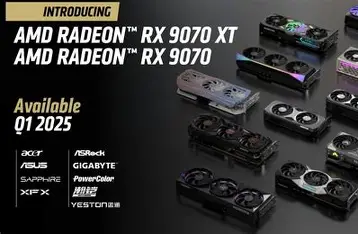
Choosing the right GPU is about choosing the card based on your usage, budget, and system compatibility. Let’s help you break it down:
A. Know Your Primary Use Case
Your GPU choice depends heavily on what you intend to use it for:
| Task | Recommended Performance Level |
|---|---|
| Casual gaming | Entry-level GPU (Like the RTX 3050) |
| 1440p gaming / creative work like video editing and 3D modelling | Entry-level to Mid-range GPU (Like the RTX 4000 series |
| 4K gaming / video editing / AI work | High-end enthusiast GPU (Go for something like the RTX 5000 series) |
| Professional rendering | Workstation or high VRAM GPU (Like the NVIDIA RTX A6000 or the AMD Radeon PRO W6800) |
B. Key GPU Specs to Consider
Understanding GPU specifications will help you judge it’s real performance:
• VRAM (Video Memory)
More VRAM allows better textures and better performance at higher resolution. Aim for:
- 4GB-8GB is generally enough for 1080p gaming
- 8-12GB is needed for1440p and future-proofing
- 16GB+ for 4K and heavy creative workloads
You can see our article on best creator laptops under $1000, if that is what you are looking for.
• CUDA Cores / Stream Processors
These are parallel processing units which set NVIDIA apart from the rest. In this case, the more usually means better performance. The architecture mostly affects efficiency. So, newer generations generally have more efficient architectures.
• Clock Speed (MHz / GHz)
Higher boost clocks generally improve performance, especially in gaming. So, better go for higher clock speeds.
• Ray Tracing & Upscaling
Support for ray tracing and technologies like DLSS and FSR will help in significantly improving the visuals and smoothness of the graphics.
• Power & Cooling
High-end GPUs can draw more power, so make sure that your PSU wattage and case airflow can handle the card.
• PCIe Compatibility
Ensure your motherboard supports the PCIe version (Gen 3 vs Gen 4/5).
Best GPUs in 2025 (Top Picks For Each Category)
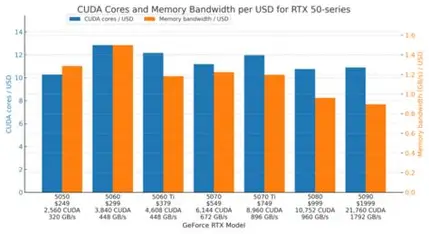
Below are the best GPUs in 2025 categorized by budget and performance, with current recommendations based on recent benchmarks and pricing trends:
NVIDIA GeForce RTX 5070 Ti
The NVIDIA GeForce RTX 5070 Ti is one of the best GPUs for gamers and creators in beginning of 2026. It offers excellent performance at both 1080p and 1440p resolutions along with support for DLSS 4 and AI-powered upscaling. Its combination of strong raster performance, efficient power usage, and robust ray tracing makes it a versatile choice if you want high-frame-rate gaming and smooth creative workflows without stepping up to enthusiast-level pricing.
AMD Radeon RX 9070 XT
The AMD Radeon RX 9070 XT is a high-performance alternative to Nvidia’s mid-to-upper tier offerings. It excels in native raster performance and offers ample VRAM for modern games and large textures. With its strong performance for 1440p frame rates and also because of its competitive price point, it’s an excellent choice for gamers focused on raw performance per dollar especially in titles where ray tracing is less critical. While it can handle 4K, its strength lies in high-refresh-rate 1440p gaming.
NVIDIA GeForce RTX 4060 (Entry-Level)
The NVIDIA RTX 4060 still remains a solid entry-level option for gamers who just want a reliable 1080p performance with the benefit of Nvidia’s DLSS and frame generation technologies. It’s an attractive option, particularly for those upgrading from older generations or building a compact, power-efficient PCs.
AMD Radeon RX 7600
This is another entry-level choice. The AMD Radeon RX 7600 brings in respectable 1080p performance at an affordable price point. It doesn’t have the ray tracing performance or modern AI features of higher-tier GPUs, but for mainstream 1080p gaming and general PC use, it’s a practical pick.
AMD Radeon RX 7900 XTX
For those who are targeting performance with abundant VRAM, the AMD Radeon RX 7900 XTX continues to be a strong contender into 2026. With 24 GB of memory and robust rasterization at higher resolutions, it’s an excellent GPU for 4K gaming and creative workflows that rely on large frame buffers. While its ray tracing doesn’t match Nvidia’s flagship solutions, its VRAM advantage and raster performance make it attractive for users.
NVIDIA GeForce RTX 5090
Sitting at the top of the consumer GPU hierarchy, the NVIDIA RTX 5090 offers unrivaled raw power for ultimate 4K gaming, high-refresh high-resolution play, and demanding creative workloads. With massive VRAM and top-tier ray tracing and AI capabilities, this GPU is designed for enthusiasts who want the best performance money can buy.
GPU Buying Tips: Avoid Mistakes and Get Best Performance
Research Real Benchmarks
Synthetic specs don’t always reflect real game or creative software performance.
Match GPU to Your Monitor
A powerful GPU paired with a low refresh 1080p monitor won’t show its full potential. Align resolution and refresh rate with GPU power.
Check Power Supply Requirements
High-end cards often require 750W+ PSU and specific power connectors like 12VHPWR.
Consider Future Proofing
Choosing a slightly stronger GPU with more VRAM helps ensure longevity as games and applications become more demanding.
If you want a gaming laptop, you can see our guide Best Gaming Laptops to buy now (United States).
If you are from India, you can see another guide on Best gaming laptops in India under 1 lakh (2025).
Conclusion: The Best GPU Is the One That Matches Your Needs
Quick Takeaways
Best GPU overall: NVIDIA RTX 5070 Ti
Best budget GPU: NVIDIA RTX 4060
Best 1440p gaming value: AMD RX 9070 XT
Best high-end performance: RTX 5080 / 5090 or RX 7900 XTX